How odio works
odio is not an appliance. Not a custom OS you flash onto a card and hand over to a boot sequence you didn’t write. It’s a Debian based platform: a coherent set of software components, each doing one thing well, assembled into a working whole.
odios is a complete vision: run the installer and an entire stack comes up, configured, wired, ready. But the model doesn’t stop there. Every piece is a standalone project. Take what you need. Replace what you don’t want. Build something nobody has thought of yet. The platform is the proposal. Your setup is the answer.
The stack is not a matter of taste.
MPD for local playback. Shairport Sync for AirPlay. Snapcast for synchronized multi-room audio. upmpdcli for UPnP/DLNA, Qobuz, and Tidal Connect. BlueZ for Bluetooth A2DP. PulseAudio as the audio routing backbone. These aren’t choices made for convenience. They are the reference implementations, the ones the open-source audio community has converged on over years. There is simply no better option for any of them.
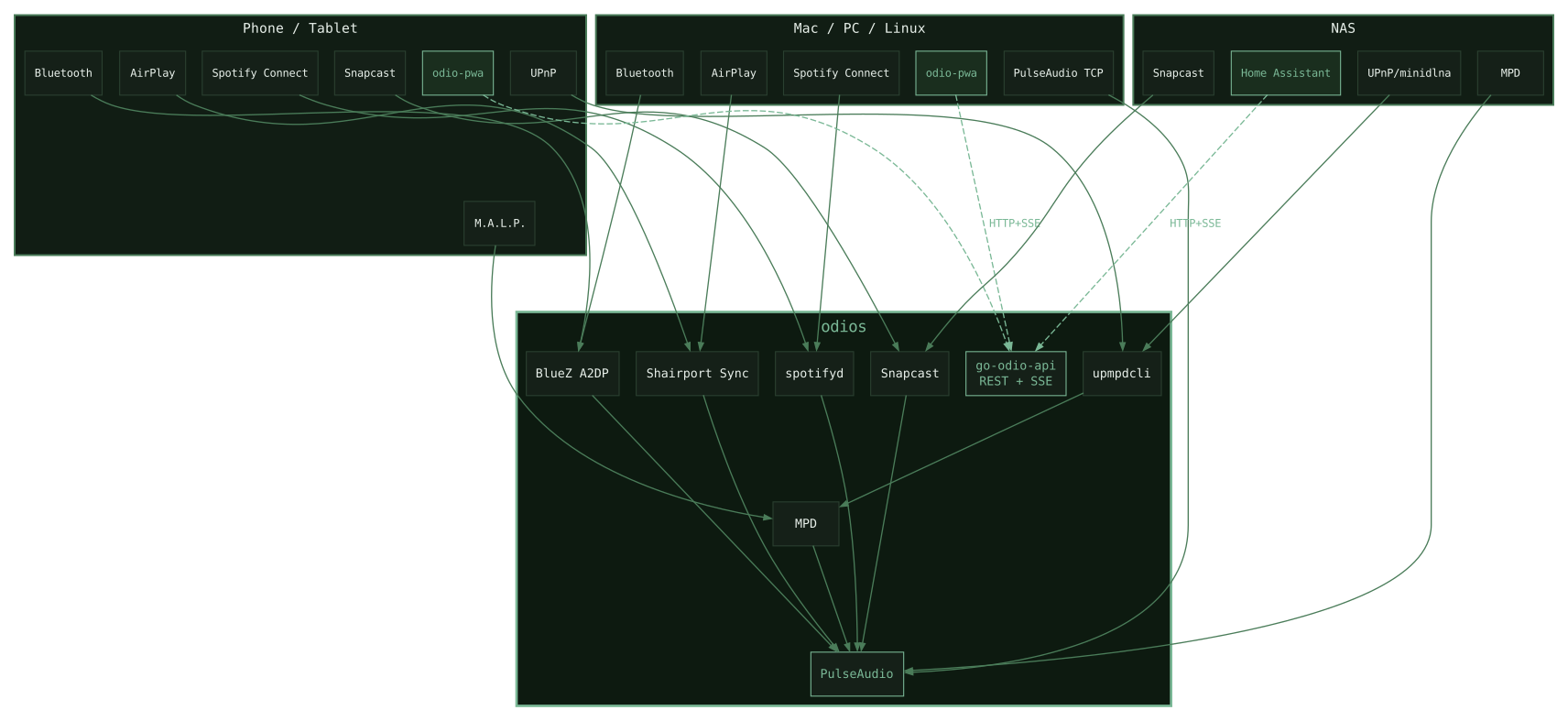
PipeWire is the future of Linux audio, and odio knows it. It will arrive as an experimental backend. For now, six years of PulseAudio TCP sink in production earns it its place.
Regarding MPD, odio takes a different approach than other audio distributions. Rather than forcing library management, which doesn’t work on a Pi B+ and a large database, odio uses MPD mainly for CD/USB and DLNA. Its UPnP renderer and network audio support let you stream directly from your NAS without indexing anything locally. However odio doesn’t prevent you from mounting your library as an nfs folder in /media/USB/<nfs>.
One decision shapes everything.
odio runs in your systemd user session. Not as root. go-odio-api actually refuses to run as root. This is not an implementation detail: it’s the architectural foundation. odio’s a guest, not a landlord.
Systemd user sessions have been the recommended model for over a decade, since systemd 200. Most audio appliances never adopted it. They stayed on the system model, with ALSA, and the constraints that come with it: one process owning the audio device at a time, exclusive access, a crackle on every source transition. PulseAudio, running in the user session, solves this at the root. There is no source switching in odio because there is no exclusive lock. MPD, Shairport Sync, Snapcast… all live in the same PulseAudio mixer at once. You don’t select a source. You just play.
The second consequence is access. Because odio lives in your user session, it has natural, legitimate reach into the entire multimedia stack: the D-Bus session bus, PulseAudio, MPRIS, logind, BlueZ user-level profiles. No privilege escalation. No setuid tricks. No daemon holding capabilities it shouldn’t need. The security model is the UNIX model: nothing invented, nothing bypassed. And just like that, every player, from mpd to bluetooth, exposes a native player we can access.
And it is precisely this that makes go-odio-api possible.
go-odio-api
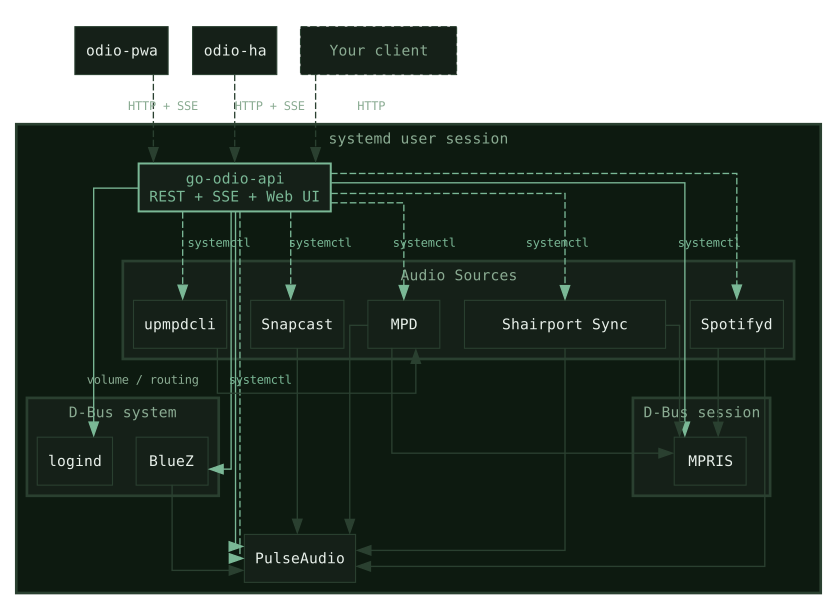
go-odio-api is what makes the stack programmable.
A REST API, written in Go, that bridges every component into a single coherent interface. Playback, volume, source switching, Bluetooth pairing, power management, output routing: all exposed as clean HTTP endpoints, with SSE for real-time updates.
The architecture is almost entirely event-driven. No polling, no busy loops. A living cache to prevent direct system access. On a Pi B+, you don’t have CPU cycles to waste. go-odio-api listens to D-Bus signals, MPRIS events, PulseAudio state changes, and reacts. Idle cost is near zero.
Every systemd user unit managed by odios is controllable through the API. No SSH, no reboot. Anything can be wrapped as a systemd unit, which makes the API a natural surface for automation. Every odio node becomes observable and controllable from anywhere on your network: a browser, a phone, a script, a Home Assistant automation.
If this sounds like KDE Connect, it’s the same space, with different trade-offs. KDE Connect assumes a desktop, a GUI, a paired client. go-odio-api assumes a network and a user session. Nothing else. It runs headless, exposes a REST surface, and does less, on purpose.
The binary ships with an embedded web UI. No separate deployment, no build step, no CDN dependency. The API and the interface are the same process, started by the same service. But the API is the product. The embedded UI is one client among many possible ones. Build yours.
go-odio-api is fully configurable and exposes only what you enable. It needs nothing more than a Linux user session, which means it runs anywhere the session model does. Beyond the Pi: an HTPC on Debian, a NAS on OpenMediaVault, a workstation on Fedora. Same binary, different configuration, same control surface. Desktop compatibility wasn’t a design goal. It’s a consequence of building on the right abstraction.
odio-ha
odio-ha is a native Home Assistant integration, installable via HACS.

It speaks directly to go-odio-api and receives real-time updates over SSE. Every odio node is auto-discovered via Zeroconf and appears as a single HA device, grouping everything the API exposes.
Playback: a main media player entity for the audio backend (PulseAudio or pipewire-pulse) with global volume, mute, and output selection. Each MPRIS player and remote audio client appears as a child media player with full transport controls, metadata, and live position.
MPRIS: auto-discovered in real time. Spotify, VLC, Firefox, anything that speaks MPRIS appears as its own entity. Add a player, it shows up instantly, zero config.
Bluetooth: the node becomes an API-controllable BT speaker, exposed as a media player in HA. Power, pairing mode, connected device, all as native entities. Try finding a Bluetooth speaker you can turn on from a Home Assistant automation.
System: systemd user services as start/stop switches. Remote reboot and power-off buttons. All whitelist-based, nothing exposed unless explicitly listed. System units are strictly read-only.
odio-ha doesn’t replace existing HA integrations. MPD, spotifyd, upmpdcli, Snapcast all have their own dedicated HA integrations for rich playback and control. In the configuration, any managed entity (service, MPRIS player, or remote audio client) can be mapped to an existing HA media player so HA treats them as one.
Not just a media player card. The full stack, exposed as native HA entities. This depth is only possible because the user session gives go-odio-api legitimate access to the entire multimedia layer, and the API turns it into a surface HA can consume.
What’s still missing is a dashboard that does the integration justice. If you build HA dashboards, odio’s waiting for you.
The ecosystem
Eight repositories. One coherent stack.
go-odio-api
The core. REST API + embedded web UI. Bridges systemd, PulseAudio, MPRIS, D-Bus and Bluetooth. The engine that makes everything else possible.
odios
The installer and service orchestrator. One script, full stack — MPD, Snapcast, Shairport Sync, upmpdcli, and all glue between them.
Progressive Web App. Install from your browser, manage all your odio nodes from one place.
odio-ha
Home Assistant integration. Complete odio support with native HA entities.
go-mpd-discplayer
CD and USB auto-play daemon with metadata.
go-disc-cuer
Go library for CUE sheet. The metadata backbone behind go-mpd-discplayer, via GnuDB and MusicBrainz.
odio-apt-repo
The apt repository. Fully CI-maintained. Packages are built and published automatically on every release.
odio.love
This site. Static Astro build, deployed to Vercel.
The foundation is six years old.
In 2020, during the first confinement, the whole stack was documented in a Medium series: apt install, systemd services, bash scripts, udev rules, one feature at a time. It worked. It went into production. Four major Debian upgrades later, the same Pi B+ in the same wooden case has never been reinstalled. Total cost of the hardware: €164.
That track record is not incidental. It comes from building on the right abstractions from the start: PulseAudio in the user session, MPD, BlueZ, systemd. Components the Linux community had already validated over years. The setup survived because the foundations were solid.
go-mpd-discplayer came from a real gap in that original setup. CDs played, but tracks had no metadata in MPD clients. The 2020 article acknowledged it: “What annoys me more is that I don’t have tracks tags.” go-disc-cuer closes that gap. GnuDB, MusicBrainz, CUE sheet output fed directly to MPD. The problem was unsolved and bothered me. Now it is not.
go-odio-api came in January 2026, built to test Claude Code. A REST API over a systemd user session in Go. The POC worked well enough to become a commitment. An API alone is useless. Home Assistant integration came right after, as it was the initial objective, then the PWA followed, because the UI was inconvenient to reach, then the installer as a way to conclude my experience started in 2020 and offer a first complete use case of the api. To establish new bases for the multimedia world.
As the vision for go-odio-api was getting clearer, the CI got serious. Unit tests. Build pipelines for every target: binaries, Docker images, apt packages, rpm packages. Then the apt repository, fully CI-managed, no manual step anywhere. A tagged release triggers the build. The package lands in the repo. apt sees it.
The installer is a vendored Ansible archive, delivered as a curl bash. Ansible because idempotent. Vendored because runtime dependency resolution is a failure waiting to happen. Curl bash because it is one command and it works. The flash image will come from that same playbook, frozen at release time. Fresh install or upgrade, same source of truth, same result.
Bash scripts become binaries. Binaries become packages. Packages get a repo. A repo gets an installer. An installer gets an image. Solid foundations make fast iterations possible. This is the kind of software chain I believe in: one where a POC can become production without being rebuilt from scratch, and where new features add on top of that base without breaking “historical” features.
About AI usage
I widely used AI, and specifically Claude Code to build odio. It’s a very controversial topic, especially in the open source world, so let me share my experience with the same open approach as for the rest of the project.
About this site: are those my words? Not entirely, not really. Are those my ideas, and those words match them? Definitely.
I’m an R&D Engineer, a lazy but demanding one. If there’s a tool that makes my work easier, I’ll give it a try. I tried AI late 2024 with go-mpd-discplayer, and wasn’t convinced at all. It helped a bit, but the AI sycophancy and hallucinations wasted a lot of my time.
But Claude Code really changed the game. It doesn’t know how to make good software, I do, at least I hope. It’s a really good Code Monkey, I’m definitely not. It has a lot of knowledge I don’t have, and I had a product vision, or at least I built one in the process.
Thanks to Claude Code I could focus on what really matters: requirements, architecture and maintainability. Adding good debug logs, regression tests, CI, packaging, documentation, basically everything that makes good software in the long run is ultra easy with Claude Code.
I’ve always preferred to work in small iterations, coming from the DevOps world, I find it’s my most effective process. Thanks to Claude Code those iterations got ultra fast. What I find amazing now is that it has completely adapted to my style of coding. The more the project grows with a strong “code identity”, the fewer corrections I need.
How do I process with AI?
I start by digging into the feature with Claude as I would with a team in a brainstorming process, especially to test edge cases and challenge architectural choices. From there we write a specification for Claude Code to write. It writes, usually in manual approve mode. I test. We fix (or not). I review then we refactor with SOLID, DRY and KISS patterns as a preoccupation. Then add tests and doc, and most of the time my two cents before merging in main. I try to commit and rebase as much as possible.
I’ve also experienced vibe coding. It mostly ended up with closed Pull Requests, and me restarting with brand new requirements, a few cherry-picked commits when lucky. Every session Claude lead was a wasted one. Mastering AI and your subject is not an option when you chose to use it.
So yes maybe Claude Code wrote most of odio stack, but I’m its architect, and the one accountable for it. Make of that what you will.
No AI was harmed during odio development. Probably.